GREYCORTEX Mendel 5.0’s new AI Assistant explains security events in plain language and helps security analysts separate real threats from legitimate network behavior.
An event name like “suspicious long NULL DNS requests, possible DNS tunneling” tells an experienced analyst a lot, but less experienced analysts may need more context. More importantly, the name alone does not answer the key questions: Is this real, and what should I do next? The same detection could indicate data leaving the network or simply a test tool left running in a lab.
In this deep dive, we look at the AI Assistant, which helps security analysts at different stages of a security investigation: host identification, IP reputation checks, event explanation, and investigation of the communication behind an event. The last two are the ones we follow through a real detection.
Earlier in this series:
How to Prioritize Host Investigations ->
How to See Who a Host Is Communicating With ->
What the AI Assistant Answers
This part is an overview of what the AI Assistant does in Mendel. It reads the data Mendel already holds, and every answer starts with the finding, followed by the reasoning behind it.
Identify an internal host. The AI Assistant names the likely role of the device from Layer 7 metadata, hostnames, tags, MAC addresses and the running services. The feature is available through the Identify device role button in the Host Dialog.
Example: You have a host with no clear hostname or device role. By examining its running services and available metadata, the AI Assistant identifies it as a likely DNS server.
Check an external address. The AI assistant assesses the address and classifies it as malicious, suspicious, reconnaissance, benign, likely benign, or unknown. Its assessment is based on application data, hostnames, blacklist records, and GREYCORTEX reputation data. The feature is available through the Check IP reputation button in the details of an external address.
Example: One of your hosts connects to an unfamiliar IP address. The AI Assistant checks its reputation and shows how it is known on the internet, including whether it is associated with a single service or shared across multiple services.
Explain an event. The AI Assistant explains what the detection means, why it matters, which MITRE ATT&CK technique is behind it, and how to check for a false positive. The feature is available through the Explain button on the detected event.
Investigate an event. The AI Assistant examines the recorded communication behind a specific event and provides a verdict, an estimated false positive probability, and recommendations for further investigation. The feature is available by opening Show more details, expanding a communication from the list, and clicking Investigate this event.
The AI Assistant can also return its answers in English, Czech, German or Polish, set separately from the language of the interface.
Step-by-step Investigation with the AI Assistant
This part shows the AI Assistant at work on one real detection: suspicious long NULL DNS requests, possible DNS tunneling. DNS is commonly used across networks, but it can also serve as a channel for command and control traffic or data exfiltration. Legitimate tools can use the same technique, so the detection alone cannot tell you whether the activity is malicious or expected.

Is this detection worth your time?
The AI Assistant explains that this detection catches DNS queries long enough to carry hidden data. The technique can be used for command and control traffic and for moving data out of a restricted network.
Now you understand why the detection matters. But you still know nothing about the specific communication on your host. That’s the next question.

Is this traffic really tunneling?
The AI Assistant examines the recorded communication between the source and the destination. Here, it found long encoded queries in the payload and repeated fragments of a known tunneling tool’s domain. The verdict: the evidence strongly supports tunneling behavior.
The AI Assistant also explains what the evidence does not prove. The evidence does not establish that an attack has taken place. You also get an estimated false positive probability and the reasoning behind it.
You now have strong evidence that this is tunneling, but you do not know whether it is malicious.

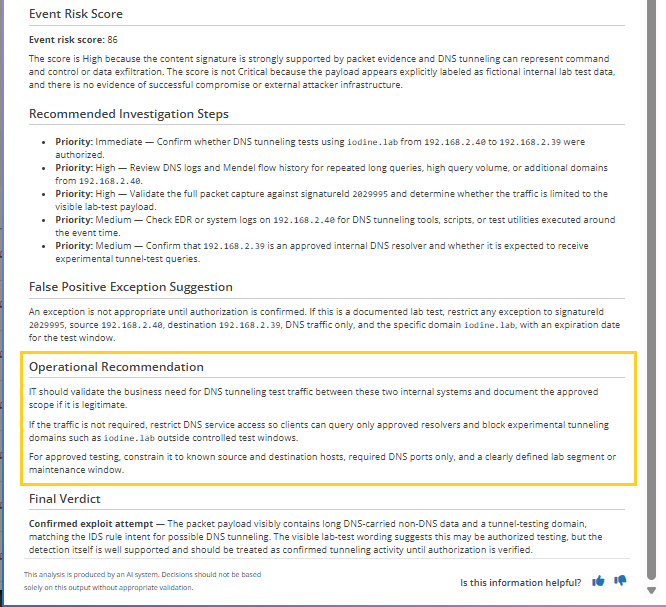
What do you do with it?
The next step is to check with your network and system administrators whether DNS tunneling is allowed on this host.
In this case it was allowed. The traffic came from testing software, and the alert was a false positive. The AI Assistant can then suggest an exception for this signature, this source, this destination and this direction. The alert stops repeating on this host, and the same detection keeps working everywhere else.
From Detection to Decision
An event name tells you what Mendel detected. The AI Assistant helps you understand the detection, examine the communication behind it, and decide what to check next. It connects the detection method with the evidence in the recorded traffic, giving you a clearer picture of what is happening.
The AI Assistant provides additional context for your investigation, but the final decision is yours. Its findings need to be checked against what your organization allows and expects. Treat the AI verdict as guidance, not proof, and verify it before taking action.
Want to see the full investigation workflow in Mendel 5.0?
Get the recording →
Categories
- Company News (38)
- Product News (31)
- IT/OT Security (42)
- Webinars (6)